You shipped the order. The customer received it. Now comes the part nobody talks about when they romanticize ecommerce: you have to go collect the money.
Call the customer. They do not pick up. Call again. They pick up but say they will send bKash "later." Later never comes. You send a WhatsApp. They leave it on read. Two weeks pass. You either write it off or spend another hour following up on a ৳600 order.
Multiply this by 50 COD orders a month and you have a part-time job that does not pay.
This is not a customer loyalty problem. It is a systems problem. And it has a straightforward fix.
Why Manual COD Collection Breaks Down
The traditional COD model was designed for a world where the courier collected cash at the door. In Bangladesh, most couriers do not do this reliably at scale - especially for smaller merchants. So what actually happens is:
- Customer receives the product
- Merchant expects payment
- Nothing happens until someone follows up
- Follow-up is manual, inconsistent, and exhausting
Even when it works, you are trading your time for money that was already yours. Every hour spent chasing payments is an hour not spent sourcing products, running ads, or building the business.
The stores that grow past a certain size are the ones that stopped doing this manually.
What Automated COD Collection Looks Like
The idea is simple: instead of you chasing the customer, the system sends them a payment link automatically at exactly the right moment - and the customer pays from their phone in two taps.
No calls. No WhatsApp follow-ups. No spreadsheet of "who has paid and who has not."
Here is the flow:
- Customer places a COD order on your Shopify store
- BD Wallet detects the COD order automatically
- A bKash or Nagad payment link is generated and sent to the customer via SMS/email
- Customer opens the link on mobile, selects bKash or Nagad, pays
- Your Shopify order updates to Paid automatically
- You see the transaction in your BD Wallet dashboard
You are not involved in steps 2 through 5 at all.
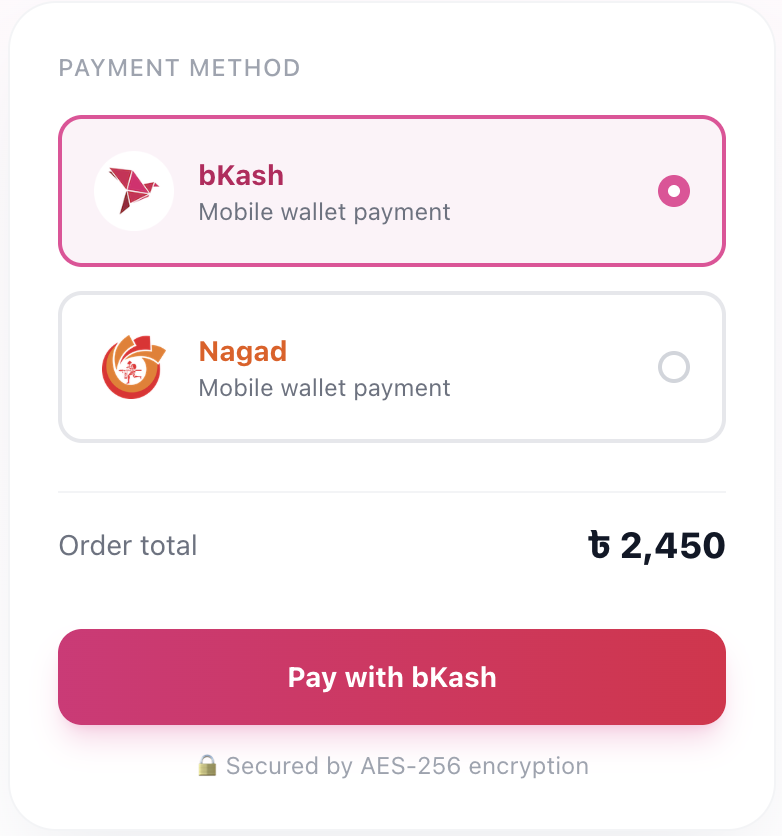
The payment link lands on the customer's phone - bKash and Nagad both available, one tap to pay
Three Ways to Trigger the Payment Link
Not every business has the same COD flow. BD Wallet gives you three trigger options so the automation fits how you actually operate:
| Trigger Mode | When the Link Sends | Best For |
|---|---|---|
| On Order | Immediately after order is placed | Stores that want payment before shipping |
| On Fulfillment | After you mark the order as shipped | Stores that ship first, collect after delivery |
| Manual | You send it from your dashboard | High-value orders where you want control |
On Order works well if you want to reduce returns - a customer who pays even a partial amount before you ship is far less likely to reject the delivery.
On Fulfillment mirrors the traditional COD model but replaces the awkward collection call with a clean digital payment link that arrives right when the product does.
Manual gives you full control for orders you want to handle personally - large orders, wholesale, or customers you are still building trust with.
You can mix these across different order types. The system is flexible.
Why Customers Actually Pay Through the Link
The friction of paying bKash to a phone number is higher than it looks. The customer has to:
- Open their bKash app
- Go to Send Money
- Type in your number
- Enter the amount (which they have to remember correctly)
- Add a reference
- Send and take a screenshot as proof
BD Wallet's payment link collapses this to two taps. The customer opens the link, the amount is pre-filled, they authenticate with their bKash or Nagad PIN and it is done. No typing, no errors, no screenshot needed.
Lower friction means higher completion rate. That is why payment links convert better than "please send bKash to this number."
What Happens to Customers Who Still Do Not Pay
Not everyone pays on the first link. BD Wallet lets you resend payment links from your dashboard with one click for any unpaid order.
You can also see at a glance which orders have a payment link sent, which are pending, and which are paid - without digging through your bKash statement or calling anyone.
For orders that remain unpaid past your cutoff, you can mark them as cancelled in Shopify directly. Clean, documented, no ambiguity.
The COD Return Rate Benefit
Here is something that does not get talked about enough: sending a payment link before you ship is one of the most effective ways to reduce your COD return rate.
When a customer gets a payment link right after ordering, two things happen:
- Genuine buyers often pay upfront, converting the COD order to a confirmed paid order before courier costs are incurred
- Fraudulent or unserious orders reveal themselves immediately - the link gets ignored and you cancel before shipping
BD Wallet also checks every COD order against Bangladesh's shared fraud registry and shows you a risk badge before you process it. You see which orders are High Risk before a single taka of courier fee is spent.
Setting It Up Takes Five Minutes
Inside BD Wallet, go to Orders → COD Settings. Pick your trigger mode. That is it.
From that point, every COD order that comes into your Shopify store gets a payment link sent automatically. No code. No developer. No Shopify plan upgrade needed.
If you have not installed BD Wallet yet, go to Shopify Admin → Apps → Search BD Wallet → Install, then connect your bKash and Nagad credentials under Settings.
Full setup including payment gateway credentials takes under 10 minutes.
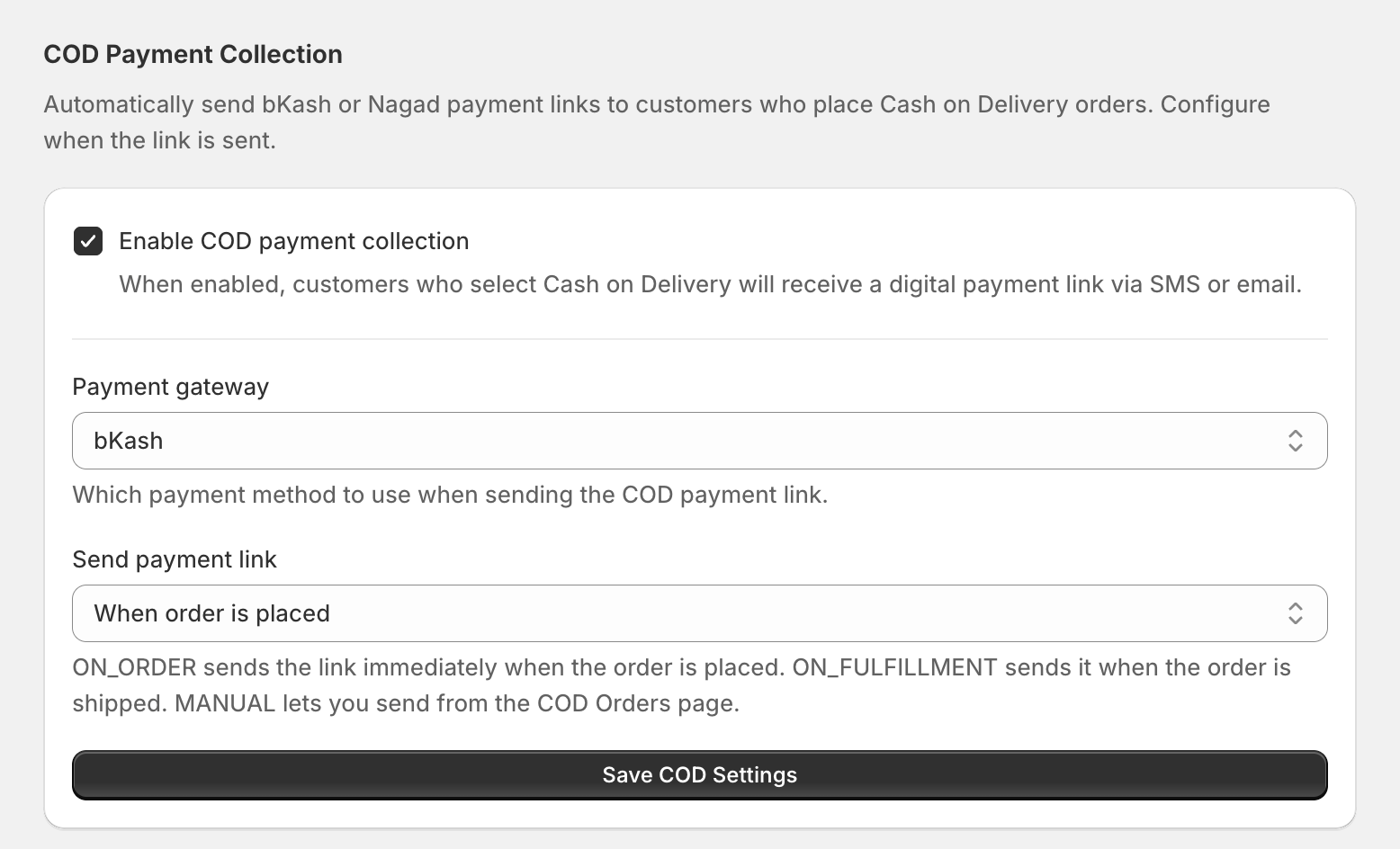
COD Settings inside BD Wallet - pick your trigger mode and the automation handles the rest
What This Is Worth in Real Numbers
Say you have 100 COD orders a month. Each follow-up call or WhatsApp chase takes an average of 8 minutes including wait time and back-and-forth. That is 13+ hours a month spent on payment collection.
At even a conservative hourly value of ৳500 for your time, that is ৳6,500 a month in time cost - before you account for the orders you wrote off because the follow-up was not worth it.
Automated collection does not just save time. It recovers money that was silently leaking out of your business every month.
Frequently Asked Questions
Does the payment link work for all customers or only bKash and Nagad users?
Currently BD Wallet supports bKash and Nagad - the two dominant mobile wallets in Bangladesh covering the vast majority of online shoppers.
Can I send the payment link in Bengali?
The payment page and link notification work across devices. The interface language depends on the customer's device settings.
What if a customer pays the wrong amount?
BD Wallet pre-fills the exact order amount in the payment link, so the customer cannot enter a wrong figure. Payments are confirmed against the order total automatically.
Can I use automated COD collection without bKash or Nagad merchant accounts?
No. You need active bKash Tokenized Checkout credentials and/or a Nagad merchant account to send payment links. BD Wallet connects to these accounts to generate and verify payments.
Does this work with Shopify's standard COD payment method?
Yes. BD Wallet detects COD orders regardless of whether the customer selected COD at checkout or another manual payment option. The automation triggers based on order status, not the specific payment method label.
What happens when the customer pays - does my Shopify order update automatically?
Yes. The moment the bKash or Nagad payment confirms, BD Wallet updates the corresponding Shopify order to Paid automatically. No manual action needed.
Stop Making Collection Calls
COD is not going away in Bangladesh. 60–70% of orders will keep coming in as cash on delivery because that is how Bangladeshi customers shop.
What can change is how you collect. Automated payment links flip the dynamic - instead of you chasing the customer, the system sends them a two-tap payment option the moment it makes sense.
Less time on the phone. Fewer unpaid orders. A cleaner dashboard that actually reflects your real cash position.
Install BD Wallet free on Shopify and automate your COD collection today.
Tagged:
Ready to accept bKash and Nagad on your Shopify store?
Free plan available. No developer needed. Set up in 10 minutes.
Get Started Free